Plugins
Wordpress plugins
6 files
-
Research on e-commerce websites proves that using badges on products increases conversion rates by 55%. YITH WooCommerce Badge Management provides you with badges and the possibility to manage them for the products of your shop.
Think about it: in your own personal experience, how interesting are the badges on products that go “50% off” or “Deal!” Withouth those badges you wouldn’t even have known about those offers and the same happens with your customers: a badge system can highlight an offer, a new product or one that’s about to run out of stock.
The plugin allows you to customise text, colour and position of the badge and provides you with a series of image-badges with a fresh and innovative design. But not only this, you can manage and almost automate badging for your shop, and at the same time manage badges individually for the products you prefer.
By doing this the plugin will grant you full freedom over what to promote within your store and how to do it: other than being able to customize the look of the badges, you can also apply them to several types of products, from those on discount to unavailable ones. This visual add-on will highlight these products in the catalog, offering you a powerful marketing tool you can use to lead customers toward specific purchases.- 2 Downloads
Submitted -
Vulnerability Measures
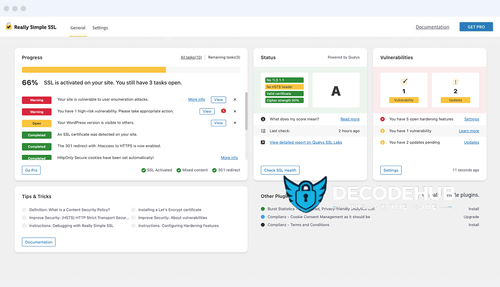
Force Updates Quarantine Plugins & Themes Peace of Mind Even if you’re not available to handle it manually. Really Simple SSL Pro can shut down vulnerabilities effectively. Hardening
Advanced WordPress tweaks Fortify your website Always in the background Keep WordPress fortified and safe by tackling its weaknesses. Security Headers
Protect your website visitors Leverage SSL certificates Improve website trust The essentials to protect your website visitors. Leverage SSL for even better security. Advanced Security
Block unused sources Force directives on third parties Latest updates to stay ahead Easily configure advanced security headers designed for WordPress.
- 1 Downloads
Submitted -
Rank Math Pro is the most powerful way to get BEST WordPress SEO tools added to your website. Rank Math is a Search Engine Optimization plugin for WordPress that makes it easy for anyone to optimize their content with built-in suggestions based on widely-accepted best practices.
Rank Math Pro Plugin WordPress Features
Advanced Google Analytics 4 Integration Keyword Rank Tracker Tracked keywords Free Content AI Trial With Credits Track Google Index Status The Most Advanced Schema Generator SEO Performance Email Reports White Labelled Email Reports Import Schema From Any Website Speakable Schema Google Trends Integration Google News SEO Sitemap Google Video SEO Sitemap Image SEO PRO Local SEO PRO With Multi Locations WooCommerce SEO PRO Complete EDD SEO Advanced Post Filtering Podcast ModuleNEW! 18 Pre-defined Schema Types 6 Extra Schema Types Automatic Video Detection for Video Schema Support for Client Sites Google Data Fetch Frequency Days to Preserve Google Data Email Report Frequency in Days Client Management Track Top 5 Winning Keywords Track Top 5 Losing Keywords Track Top 5 Winning Posts Track Top 5 Losing Posts Advanced Content SEO Overview Check Ranking Keywords for Each Post Position History for Keywords & Posts Add Custom Schema Using JSON+LD/HTML Validate Schema With Google Custom Schema Builder Add Unlimited Multiple Schemas 840+ Schema Types Supported Automate Schema Implementation Dataset Schema Fact Check Schema Podcast Schema Carousel Schema Mentions & About Schema Automatic Q&A Schema for bbPress Advanced Redirections Module Advanced Local SEO Blocks Google AdSense Earning History Import GSC & GA Data from Particular Country Custom Setup Wizard Mode Watermarked Social Media Images Advanced Bulk Edit Options Complete Import/Export Options Complete Elementor Integration Dedicated Elementor Breadcrumbs Widget Elementor Accordion Widget to FAQ Schema Complete Divi Integration Divi Accordion Widget to FAQ Schema Import/Export Focus Keywords Import SEO Data via CSV File Import Redirections Data via CSV File Advanced Quick Edit Options Detect Orphan Pages Single Post Performance Badges Automatic Video Data Fill for Video Schema Track PageSpeed for Each Post & Page Track SEO Performance of Individual Posts Sync Redirections to .htaccess Noindex Password Protected Pages Export 404 Log Advanced HowTo Schema Mark Cloaked Links as External Links Find & Replace Image alt/title/caption Text Automate Image Captions- 1 Downloads
Submitted -
Improve Every Aspect of Your WordPress Design: Live, Easy and Fun. Goodbye backend! Design all your forms live, right from the Elementor editor. Choose your fields, increase spacing, set columns and layout... Control everything, all without ever leaving the editor.
- 0 Downloads
Submitted -
🔥 Yoast SEO: The #1 WordPress SEO Plugin
💡 Take your website to the next level! Write smarter content, dominate Google rankings, and automate your SEO workflow — all with one powerful plugin.
🚀 Why Choose Yoast SEO?
🟢 Trusted since 2008 – Yoast SEO has helped millions of websites, from local bakeries to some of the biggest names online, improve their search engine visibility.
🎯 With a mission of “SEO for Everyone”, Yoast offers both a Free and a Premium plugin to fit all your needs.
💎 Yoast SEO Premium Features
✅ Keyword Optimization – Tell Google exactly what your page is about
✅ Outdated Content Alerts – Keep everything fresh and relevant
✅ Google Snippet Previews – See how your content will look in search results
✅ Readability Analysis – Make sure your content is easy to digest
✅ Breadcrumbs Control – Improve navigation and structure
✅ Duplicate Content Prevention – Avoid SEO penalties
✅ Internal Linking Suggestions – Strengthen your site's architecture
✅ Redirect Manager – Fix broken links effortlessly
✅ Works with both Classic & Block Editors
✅ Always Up-to-Date with Google’s Algorithm
✅ Technical Optimization in the Background – So you can focus on content
- 0 Downloads
Submitted -
RAR PASS: crackfrm.org
Boost Your WordPress Performance with WP Rocket 🚀
WP Rocket is a modern caching plugin for WordPress, launched in 2013 to tackle slow-loading sites. It applies the best performance practices automatically upon activation—no configuration needed. With its intuitive interface and smart defaults, most sites see dramatic speed improvements in minutes.
⚡ Key Benefits
Instant Setup – Activate and go; no technical skills required.
Smart Caching – Page caching for desktop & mobile, plus cache preloading.
File Optimization – Minify, combine & defer CSS/JS to reduce HTTP requests.
Database Cleanup – Remove post revisions, spam comments & transient data.
Lazy Loading – Images, iframes & videos load only when they enter the viewport.
CDN Compatibility – Works with any CDN or optionally use RocketCDN (paid).
Advanced Features – DNS prefetch, link preloading, Google Fonts optimization.
Security Integrations – Supports Cloudflare, Sucuri & Varnish for extra caching.
🔧 Top Features at a Glance
Page Caching & Cache Preloading
CSS/JS Minify & Combine
Delay JavaScript Execution
Remove Unused CSS
GZIP Compression
Control WordPress Heartbeat API
Database Cleanup & Optimization
Cloudflare Add-On
Import/Export Settings
Page-Builder Compatibility (Elementor, Divi, Beaver Builder…)
Prefetch DNS Requests & Preload Critical Assets
- 0 Downloads
Submitted