




Plugins
İnvision Community 5 Plugins
16 files
-
This application clones the native "Who's Online" widget, but with MORE FEATURES!
Displays numerical statistics of online users
Hidden user
Group legend
And you can manage how this information appears to your liking.
If you want to download group legend separately:
https://decodehub.org/files/file/96-mric5-group-legend/
-----------------
Working well in version 5.0.18
If you need help or suggestions, comment in the support topic.- 0 Downloads
Submitted -
This application forces the user to give a reaction (reputation) before being able to download the file. The download is released immediately, without having to refresh the page.
Configuration options:
Prevent reaction removal
Groups that can bypass
Categories where the functionality applies
Video: https://mega.nz/file/46tl1ZLb#BocOTSFv2GaVm5Q8YRuKPX6r3ytynG9HjsVjnYdhWHQ
----------------------------------------
ACP > Community > (MRIC5) Reaction Download
Working well in version 5.0.18
If you need help or suggestions, comment in the support topic.- 0 Downloads
Submitted -
This application creates a widget that lets you display the names of your website's user groups.
You can also configure the widget to specify which groups appear in the list.
---
Working well in version 5.0.18- 0 Downloads
Submitted -
This application creates a widget that displays a team member in the list whenever they come online.
Users with admin permissions always appear at the top.
Widget settings:
Groups to Display (only groups with moderator and administrator permissions appear in the list)
Message Button
Find Content Button
---------------------
Working well in version 5.0.18
If you need help or suggestions, comment in the support topic.- 0 Downloads
Submitted -
This is a simple application that displays the reaction icon in notification.
----
ACP > Members > Member Settings > Reputation & Reactions > "Reaction icon in notifications"
Working well in version 5.0.18.
For bugs or suggestions, comment in support topic.- 0 Downloads
Updated -
Installation Guide
Installing the Application
After downloading the .tar file, navigate to ACP (Admin Control Panel) > Applications and install the application.
Modifying a PHP File
Use an FTP client to locate and open the file:
\system\Content\Content.php
Search for the following line:
else { $obj = parent::constructFromData( $data, $updateMultitonStoreIfExists ); } Add the following line immediately below it:
Event::fire('onLoad', $obj); Save the file after making the changes.
Configuring the Application
Once installation is complete, go to ACP > Community > Hide it to configure the application.
The Hide it application allows hiding content from posts in Forums, Pages and Downloads. It supports selectively hiding specific sections or entire posts.
The application may not work properly on IPS Cloud.
Features:
Select databases and categories for hidden content.
Specify user groups for hidden content.
Options for hiding specific content: links, images, attachments, code, or the entire post.
Options to unhide content:
Give a reaction
Leave a comment
Reaction or comment
Reaction and comment
Reload content in ajax after giving reaction to unhide content without reloading page.
- 1 Downloads
Submitted -
This application allows users with permission to change the post author.
It also generates a moderation log when the author is changed.
Works with the following applications:
Forums
Blogs (Future version)
Downloads (This functionality already exists natively)
----
ACP > Community > (MRIC5) Change Author
Working well in version 5.0.18- 0 Downloads
Submitted -
Hello, this is my first application.
This simple application allows the administrator to define which group the user should be moved to when banned from the site.
It can be useful if you have a special user group where you want to display these users.
ACP > Members > Member Settings > Ban Settings > Move Banned User
Working well in version 5.0.18.
Video: https://mega.nz/file/9vd12R7Q#oVqGtoPYg3ktkydRW__Z1SEQfUdjNZ8rCVPPWPoCfxM- 0 Downloads
Submitted -
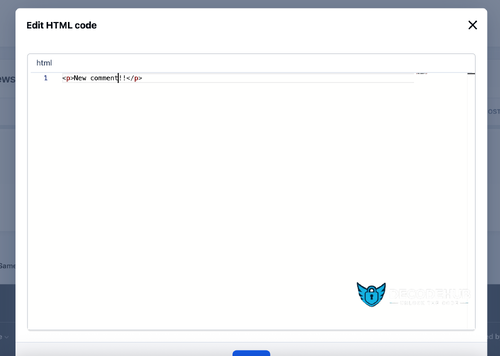
HTML Editor is an application for editing the HTML code of posts and reviews. It was created to replace the outdated Edit HTML of Posts editor.
Features:
Select users/groups (administrators only) who can edit the HTML code.
Enable/disable logging.
Add/remove an icon next to a link.
Supported applications:
Pages
Forums
Commerce
Events (calendar)
Blogs
Private Messages
Gallery
Downloads
The skis are not mine, I have not tested them. Downloaded from invisiondevs.com.- 0 Downloads
Submitted -
Stop Forum Spam is an app from invisiondevs.com designed to prevent spammers from registering on the forum. When a new user registers, the app checks their email address, IP address, and/or username, and if this data is found in the spam database at https://www.stopforumspam.com/, it blocks the account.
I haven't tested this. If you've had success, please let me know in the support thread. To test this, you can use the data from here: https://www.stopforumspam.com/downloads.- 0 Downloads
Submitted -
This app will display a popup or redirect user to a page reminding them to update their information before browsing the website.
Features:
Enable/Disable the feature.
Select user groups required to fill in the information.
Choose required information fields, including:
Profile photo
Cover photo
Signature
Profile fields
- 1 Downloads
Updated -
Enhance your site with beautiful, fully responsive Sliders and Gridview options that adapt seamlessly to any device.
Flexible Slider Customization: Choose from horizontal, vertical, or random modes; set autoplay, speed, duration, buttons, and more.
Gridview: Showcase your content in a stylish, organized layout.
Auto-Content: Automatically generates sliders from content in: Pages, Forums, Gallery, Downloads, Clubs, Commerce, and Videobox.
RSS Feed Support: Automatically fetch content from RSS URLs.
Custom Content Management: Easily add and manage custom content to your slider/gridview; drag & drop to sort, click to edit titles, upload images, and add links.
Thumbnail Caching: creates and saves thumbnail cache for faster loading.
Widget Support: use widget to display slider/gridview.
Popup View: quick view content in a popup (supports Forums, Downloads, Pages, and Videobox)
- 1 Downloads
Updated -
EasyPopup offers a powerful, customizable solution for creating eye-catching popups on your website. Configure everything from size, position, and transitions to timing, content, and audience targeting. With IPS Member Filters, you can tailor popups to suit specific groups and boost user engagement effortlessly.
Features:
Width/Height.
Transition open/close: FadeIn/FadeOut, SlideIn, SlideUp, SlideDown, SlideBack.
Transition speed.
Positions: Top Left, Top Center, Top Right, Middle Left, Middle Center, Middle Right, Bottom Left, Bottom Center, Bottom Right
Background color.
Compose popup content using the Editor or HTML, or simply upload an image.
Supports advertisement tag in the HTML code: {advertisement="key"}
Auto close and show timer on popup.
Showing popups every page loads or every X minutes.
Waiting for X miliseconds to show.
Easily set specific URLs for popup display.
IPS Member Filter System to show popups. (filter by groups, content count, joined date, last posted, last visited, reputation, member of the day....)
- 3 Downloads
Updated -
Description:
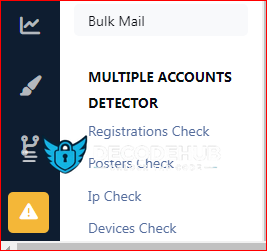
This app scans the database to detect members who have multiple accounts at your forum, and it will list the results. You can also auto ban new multiple registrations of members who have previously registered an account and/or accounts at your forum. The auto banning is done on basis of ip addresses and devices. You can also exclude ip addresses and devices from being auto banned when registering multiple accounts.
Detection Method:
The detection method is being done in 4 ways.
1) Registration Method:
This method is based on scanning the members table for members who have registered more than one account at your forum from the same ip. The ip address in question will be displayed with the latest multiple account. When the ip address is clicked upon, it will display all the other aliases of that member.
2) Posting Method:
This method is based on scanning the posts table for members who have posted from more than one account at your forum from the same ip. The ip address in question will be displayed with the latest multiple account. When the ip address is clicked upon, it will display all the other aliases of that member as well as the posts and topics that they have posted.
3) Ip Login Method:
This method is based on scanning members known ip addresses, i.e. their last used ips, during the login and if a member has logged in to different accounts from the same ip, the action will be logged and displayed.
4) Device Detection Method:
This is the most accurate method imo. Ipb adds a unique cookie to members devices when they log in to the forum. The cookie expiration date is set to one year and its unique string is associated with the users device and stored in the device table. This means if someone logs in to your forum, logs out and then logs in using another account and a different ip address, then it can tell that it was the same person. It means that person has to use same machine, same browser irrespective of the ip address he/she is using.
Search:
All 4 multiple accounts detection methods have a quick search option where you can search the results based on members names.
Auto Banning:
All users who will try to register multiple accounts using the same ip address or device can be banned automatically upon registrations. Admins can exclude ip address(es) and device(s) from being banned.
Compatibility:
This app is compatible with Ipb 5 only. If you are using the Ipb 4.7. version of the app you will have to uninstall it first. Then you can install this one. No data will be lost as the app doesn't add a table of its own to the database, but queries the relevant Ipb tables.
- 1 Downloads
Updated -
This is very simple chat system with the basic features:
Ajax chat, auto update.
Display as a widget, so you can place it in sidebar or top page.
Sound notification. User can toggle on/off.
Admins/Moderators can block users.
Load more messages when scrolling end (or top).
Rules.
Supports emoticons, URL, Images (GIF, PNG, JPG)
Supports GIPHY to finds GIFs and Stickers by using /giphy command (Eg: /giphy happy new year)
Supports Voice Messages
Supports Youtube, playing video in iframe and popup
@mention by clicking on usernames.
Flood control.
Bad word filters.
Time format.
Display newer messages in top or bottom.
Permissions for viewing, chatting & management.
Edit/Delete messages.
- 4 Downloads
Updated -
Member mention - application allows you to add a button to mention a user in his message.
App settings
To set up the application, go to Theme editor > Content > Body > Mention.
Here you can choose four button locations:
Author pane (next to the name).
Post controls.
Post user stats
Post user info
- 0 Downloads
Submitted









.thumb.png.ba5bdd062b71bf22bf219b8b36e96253.png)

.thumb.jpg.b0e7cedfb0d9aaddcc75ca94f4694c43.jpg)
