Plugins
XenForo plugins
14 files
-
Features
Everything is available from within XenForo (you do not need to go to Cloudflare for things) via the Cloudflare API. This allows you give admins permission to do certain things (for example block IP addresses within Cloudflare without giving them access to your Cloudflare account).
It simplifies/automates much of the configuration and usage of Cloudflare with XenForo.
Manage all Cloudflare settings/options for your zone.
Ability to purge Cloudflare cache.
Cloudflare Firewall support
You can automatically create firewall filters to block access to XenForo internal directories that are not intended to be accessed via web browser (internal_data and src). You can also delete any firewall filter.
Create/delete Firewall user agent rules.
Create/delete Firewall IP address rules. Includes the ability to optionally expire the rule in the future (for example maybe you want to block a class C for 7 days, or you want to force a challenge to a specific IP for 30 days).
Manage country-level traffic blocking (includes Tor exit nodes).
Ability to force challenge on the registration and contact forms (helps mitigate automated spam).
Cloudflare Access support
You can automatically create Access policies to allow only admins the ability to access the install and admin.php URLs. You can also delete any existing Access policy.
Cloudflare Page Rules support
You can view and delete any Page Rules on your zone.
Cloudflare Cache Rules support
You can automatically create a Page Rule that will instruct Cloudflare to cache XenForo CSS files (normally they are not cached because Cloudflare caches based on file extension, and XenForo's CSS system has .php extension).
You can automatically create a Page Rule that will instruct Cloudflare to cache images served through XenForo's image proxy (similar to XenForo's CSS, Cloudflare normally does not cache them because the image proxy uses .php extension).
Cloudflare Turnstile support (requires XF 2.2.12+)
You can automatically configure/create Turnstile site via API.
Gives direct links to Turnstile Settings and Analytics within Cloudflare account.
DMARC Management allows you to monitor third parties sending email on your behalf
Use Cloudflare Workers as proxy to hide your server's origin IP address for certain XenForo functions:
Image proxy
Unfurl
Support for Cloudflare R2 (object storage) to store things like avatars and attachments in the cloud.
Support for caching HTML pages for guests at the network edge (in Cloudflare data centers).
Shows Cloudflare statistics for your domain on admin index. Additionally, daily statsare kept in XenForo's normal Statistics area for:
Unique visitors
Requests
Data served
Data cached
Threats
Turnstile challenges
Turnstile interactive solves
Turnstile non-interactive solves
Turnstile unsolved
R2 class A operations
R2 class B operations
Moderators that have the ability to spam clean and view user's IPs get an extra option in the spam cleaner where they can temporarily ban the IP address(es) the spammer used in the last 30 days. The number of days to ban is an option you can set in the admin area (it defaults to 7 days).
Ability to backup and restore certain Cloudflare configuration (Access Apps, Firewall Rules, Firewall IP Access Rules, Firewall User Agent Blocking, Page Rules).
You can restore backups to a different zone (for example if you had extensive configuration for a zone, you could give another zone the same configuration through a backup restore).
Restoring a backup does not delete existing configurations (you are able to merge configuration into an existing config).
Cloudflare configuration is protected by a new admin permission, Manage Cloudflare.
In exchange for being free, this addon has a single attribution link buried on the bottom of XenForo's Help -> Cookie usage page (there are no site-wide or footer links).
- 0 Downloads
Submitted -
User profiles
General cosmetic clean up of profiles. Also has options to pick what does/does not show on the user blurb.
If you remove certain things from the user blurb (for example join date), it will still be available on the About tab on user profiles.
Profile tabs
The Activity tab and Postings tabs are configurable with user group permissions: Has activity tab on profile and Has postings tab on profile.
Control over user profile fields used for spam
The ability to use Website, Location and About you fields are controlled via user group permissions. Additionally, you can automatically ban users that try to submit those fields when they don't exist (spam bots).
Review About you edits
Ability to send member's "About you" edits to a review queue before they are published (user group permission for which user groups require reviews and who can perform reviews). Additionally, you can control which user groups can use BBCode within the About you field.
Diplay names
Users have the ability to have display names (separate from usernames). The ability to pick one during registration is done with the User registration -> Choose display name during registration option. The ability to change display names is done with the user group permission, Change display name. Can also be changed via user edit in admin area.
Usernames are prefixed with @, to give a visual indicator that you are looking at a username vs. a display name.
Display names aren't necessarily unique, so you can't completely address users strictly by their display name. Normal username searches do give you the ability to search by display name (but you'll still be presented with usernames due to the uniqueness thing). For example:
You can see generally how usernames vs display names are presented in various areas (one user has a display name and is "verified", while the other user just has the more traditional username only):
Verified users
You can set certain user group(s) to have a verified badge next to their display name (or username if they don't have a display name). Done via the Verified user group permission.
User notes
User group permission based user notes (intended for mods/admins to keep notes about users).
User bookmarks
Users can be bookmarked (user group permission: Can be bookmarked)
Avatar and banner resolution
Slightly increase avatar and banner resolution (keep up with higher resolution screens)
Attribution
In exchange for being free, there's a small link to my website only within the "members" route (user profiles are the most relevant part of the site), next to the RSS icon.
- 2 Downloads
Submitted -
[TaylorJ] Probations
Description
This addon will allow you to place users on a read only leave from your site, as if they were banned but still have the ability to read posts and visit the site.
Sometimes a full on ban isn't what is needed and a user just needs to be quiet for a few hours/days. Idea taken from SomethingAwful.
Options
[TaylorJ] Probations - Options
NameDescription
Maximum number of days allowed to selectThis limits the user giving the probation on how many days they can place a user on probation for.
Maximum number of hours allowed to selectThis limits the user giving the probation on how many hours they can place a user on probation for.
Permissions
[TaylorJ] Probations Permissions
Can view probations
[TaylorJ] Probations Moderator Permissions
Can put users on probation
Cron Entries
NameRun on...Run at hoursRun at minutes
[Taylor J] Probations: Hourly CheckAny day of the monthAny0
- 1 Downloads
Submitted -
Description :
This add-on allows you to customize your prefixes and your banners. You don't need to create CSS class now, you can do it more easily with our add-on !
Feature summary :
Options :Select your color :
Color
Background
Border
FA icon
Compatible with :
Prefixes (threads & resources)
User groups (user banner styling)
Branding :
This add-on does not include branding.
Installation :
Download and unzip it.
Copy the src/addons/XenSoluce/CustomColorsPicker directory to your server.
From the AdminCP install the add-on.
- 0 Downloads
Submitted -
Description:
Create a widget and add additional widgets inside and show them as tabs. More in screens below
Features:
create up to 8 tabs and add widgets to preset widget positions
add an icon for widget tab title
easy choose between two tab header styles
show widgets title (useful if you want to have more widgets in the same tab)
hide tabs to a certain user group with permissions
- 0 Downloads
Submitted -
Calendar, as the name suggests, is a full-fledged calendar and events management system.
Features:
Allow users to create new events in configurable 'calendars'. Custom permissions allow you greater control over who can see a event.
Calendars can be customised so different calendars can have different coloured events, for example.
Optional agenda-based layouts.
Style properties available to fine-tune Calendar appearance.
Support for featured events that display above the calendar.
Event creation that fully controlled by the permission system.
Support for all-day events and multiple day ones too.
Support for recurring events and a number of options to fine tune how often they recur.
Support for RSVP with limited and unlimited number of attendees.
Users are then able to view a guest list of who is attending, might be attending and not attending.
Users that RSVP or watch events will be notified when key event details change.
Attendees can be reminded when an event start date is approaching.
Ability to view a list of attendees and non-attendees.
Users are able to invite others to RSVP to events.
Users are able to add events to their own personal calendar apps via .ICS files.
Events can generate associated discussion threads on creation.
Locations can be attached to events, letting you pull in mapping information from Google's APIs.
If enabled, locations can be auto-completed using Google's Places API.
Events can be filtered based on location and how far away they are.
Custom fields are fully integrated within the add-on letting you capture custom data for different Calendars and display the data in a variety of locations.
Integration with XenForo core functionality.
End users receive alerts and emails when others RSVP to their events with appropriate opt-outs.
Support for content tagging.
Support for content watching.
Support for attachments.
Support for inline moderation.
Supprt for moderation queue and moderated events.
Ability to search for events based on criteria.
- 0 Downloads
Submitted -
There are 11 ad types available:
1. Code
Display HTML/JavaScript ads such as affiliate banners, Amazon product widgets, Adsense, etc. This ad type also supports PHP callback to generate your own custom code.
2. Banners
Display banner ads that you can upload directly or from an external source. You can use multiple images to rotate randomly on each page load.
3. Text
Display text ads with custom title, description and optionally a banner image.
4. Links
Display link ads with custom title. You can use it to build link lists in the forum sidebar or display horizontal links in other places.
5. Keywords
Transform text keywords in thread posts, conversation posts (optionally), profile posts (optionally) into links with a tooltip description (optionally). As admin you can use it without link and can also add inline CSS to style the keywords as you want.
6. Affiliate Links
Convert links to affiliate links using 4 link building methods. Optionally you can replace the link anchor text with a custom text. You can also hide the affiliate URL when hovering over the link.
7. Sticky Threads
Create/sell sticky threads in the forums you want.
8. Featured Resources
Create/sell featured resources in the categories you want.
9. Popup
Display popup ads in 3 ways: XenForo overlay with title and content, custom popup code and popup window with custom window features.
10. Background
Display a background image as an ad with clickable left and right parts of the image. If you provide multiple background images, they will rotate randomly on each page load.
Popup and background ads can be controlled how often they show up and after how many seconds to display. You can even hide them after x seconds of display.
Code, banner (Custom HTML), text and popup ads support XF template syntax.
There are over 90 default positions and 30+ of those are predefined dynamic positions that allows you to display ads between thread posts, conversation posts, profile posts, media items, resources and more.
With Ads Manager you can:
Display ads individually, grouped or in rotation
Display the same ad(s) on multiple position(s) at the same time
Rotate multiple ads in any of the 11 available orders
View detailed statistics for each ad (general, daily, click and Google Analytics statistics)
Manage multiple ads at the same time
Display/hide ads after x seconds
Display ads every x hours
Choose who will see the ads, where and when
Create custom positions and use them in any template or widget you want
Embed ads on pages outside of XenForo on any domain
Automate the ad selling process using packages
Sell ads per day, week, month, year, CPM or CPC
Use backup ads when there are no active paid ads
Globally hide ads from certain threads or pages such as login, register, etc
Enable advertiser page where all active ads are displayed
Add advertisers to custom user groups
Use XF template syntax to include templates and widgets in ads
Use Position Criteria to display ads based on thread title, author, tag, prefix and more.
Use Device Criteria to target certain devices based on type and model, platform and browser.
Use Geo Criteria to target/block specific countries.
- 0 Downloads
Submitted -
This is an AJAX based chat application that does AJAX calls to the server to get new messages.
Main Feature
Rooms
Dedicated guest room with nickname support
Archive with search criteria
Top chatters page
Private conversations
Sound, desktop & browser tab notification
Global user commands (21 commands that you can manage and you can also add you own custom commands)
Custom user commands (Can be used to set predefined messages/responses via command)
User settings
User status
User group permissions
User sanctions (Mute/Kick/Ban)
User image uploads
Style properties
Lots of admin options to enable/disable certain features
Bot notifications for new threads, new posts, new users, new Resource Manager resources, new Media Gallery albums/media/comments
Bot responses that can be trigger by predefined keywords
Bot messages that are posted automatically at set time/date
Display notices in rotation (can be edited via the built in rich text editor)
Display ads in rotation
Set chat rules page
Rooms widget
Top chatters widget
Active users widget
Chat is loaded as a widget and you can customize the widget to load the chat at certain times on certain devices.
Chat uses the built in XenForo rich-text editor and you can disable individual buttons/BB codes.
Room options
Name
Description
Password (optional with user permission)
User groups - Allows you to enable room access based on user group (admin option)
Read only - Allows you to make room read-only (admin option)
Locked - Allows you to lock the room until a certain date (admin option)
Auto-prune messages every x hours (admin option)
Thread ID - If you set a thread ID, messages posted in the room will also be posted in the thread (admin option) In ACP there is an option that allows you to set the minimum length required for a message in order to be posted in a thread.
Room message features
Like/Unlike
Quote
Link
Report
Edit
Delete
Conversation message features
Like/Unlike
Quote
Report
Edit
Delete
When scrolling to the end of the messages in both rooms and conversations, a button will show up to load more messages.
You can also use the /find command followed by a keyword to search for messages.
- 0 Downloads
Submitted -
XenGenTr] statistics - Technical specifications
It is a widget system with Tamami.
New, recent messages.
New issues.
The subjects that received the most reply.
Most viewed topics.
Top rated topics.
You can withdraw the above data from the required forums in any number of times.
1 user statistic requested.
User names appear in user group colors.
Topic link next to Google search button.
The change in the database works without any new additions.
Of course 100% Mobile compatibility.
Options of the insert
User groups that can view attachments can be restricted.
Unwanted widgets such as new topics, messages, hit topics can be turned off.
Member Stats On / Off.
Open / Close in user name group color
Google search button on / off
- 0 Downloads
Submitted -
If you want a profile added immediately, I charge $25 per profile.
This add-on is a port of GamerProfiles - PixelExit.com, which @Steve F has kindly allowed me to release.
This add-on makes use of the custom user fields by allowing your users to input their various gamer tags from the games they play. It can be configured to use certain gamer profiles if you do not wish to display them all. Simply look in the style properties [AH] Gamer Profiles for settings for displaying what icons you would like. If you have a suggestion mention it and I'll see about adding it. This add-on supports sites running SSL as well, mainly the linked images.
Supported Profiles
Steam
PlayStation
Xbox
Origin
Oculus
Battle.net
Epic Games
Second Life
Discord
Guilded.gg
Twitch
Facebook
YouTube
The following are default in XenForo
Facebook
Skype
Twitter
Configure:
Set what icons to display and set permissions to view.
ACP -> Groups & Permissions -> User Group Permissions
ACP -> Style Properties -> [AH] Gamer Profiles
- 0 Downloads
Submitted -
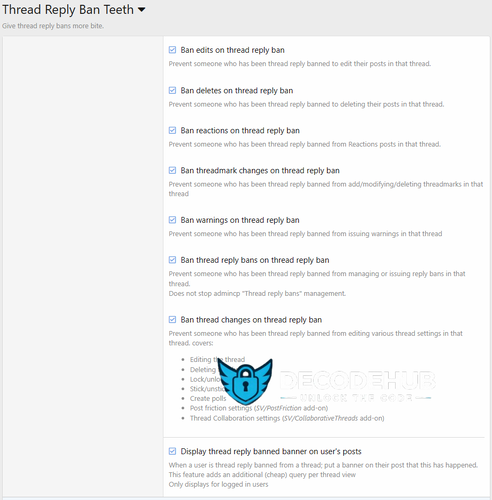
Supports extending thread reply bans into full thread-bans, but optionally disabling the following functionality in a thread someone is reply banned from;
Edit posts
Delete posts
React to posts
Threadmarks
Various User Essentials' "X in own thread" permissions
Reply Bans
Warnings
Thread changes:
Editing
Deleting
Lock/unlock
Stick/unstick
Create polls
Move/merge actions
Post friction settings (SV/PostFriction add-on)
Thread Collaboration settings (SV/CollaborativeThreads add-on)
Will display if a user is XF banned or reply-banned via a banner on the user's post.
This can be controlled via the option "Display thread reply banned banner on user's posts".
Note; this feature required an additional (cheap) select query.
- 0 Downloads
Submitted -
##Features
This add-on provides a “Top threads” view, ordered by the first post’s reaction score (upvotes minus downvotes). It is a minimal scaffold that installs cleanly, with no schema or XML.
---
## Usage
Global Top: /aixf-top
Forum Top: /aixf-top/forum?node_id=NN (replace NN with the forum’s node ID)
---
## Notes
Relies on the first post’s reaction_score (XenForo maintains this automatically).
No database schema changes; uninstall is clean.
Works on XenForo 2.2+ and 2.3+.
Optional: create Upvote (+1) and Downvote (–1) reactions for best effect.
- 0 Downloads
Submitted -
Introducing the Limit Resource Downloads add-on
Limit Resource Downloads add-on gives forum admins powerful control over resource downloads by allowing them to set a variety of limits, such as:
Daily download limits
Positive Reaction requirement
Minimum message count limits
Force account upgrade
The add-on also includes informative interfaces and user-friendly error pages that explain the reasons for download restrictions. This helps to discourage abuse and promote fair use of resources.
In addition, the add-on can encourage user engagement on the forums and can lead to more account upgrades, boosting your site’s revenue.
Key Features
Here are some of the key features of the Limit Resource Downloads add-on:
Usergroup permissions: This allows admins to fine-tune who can download resources, and under what conditions.
Support for setting permissions in each Resource Category: This gives admins even more granular control over download limits.
3 types of limits: Admins can choose from customizable download limit, reaction limit, and message count limit.
Ability to bypass limits: Admins can allow users to bypass limits by setting them to “Unlimited” or by granting them the appropriate usergroup permissions.
Info Tabs Bar: This provides a quick overview of the user’s current download limits for the viewed resource.
Download Limits Overview Page: This provides a detailed overview of user-specific download limits for the accessed resource.
Custom Buttons: These buttons provide quick user info/alerts, such as the number of downloads left or an alert that the download limit has been exceeded.
User-friendly error pages: These pages explain and guide users through download limits and restrictions.
Admin options: Admins can customize the download limit reset time, enable/disable the Info Tabs Bar and Download Limits Overview Page.
Easy customization: Custom classes and dedicated style properties for effortless customization.
Restrictions on changing or undoing reactions, controlled by admin options & usergroup permissions.
If you’re looking for a powerful way to control resource downloads on your XenForo Resource Manager, the [XenCustomize] Limit Resource Downloads add-on is a great option. It’s packed with advance features and gives admins the flexibility to fine-tune download limits to meet their specific needs.
Screenshots, Install and Setup
Install "[XenCustomize] Limit Resource Downloads" like any other XenForo add-on. In the admin options:
Default setting for the Countdown timer is 5 seconds, which you can adjust to your preferred duration.
You must specify your preferred positive reaction IDs.
Default positive reaction IDs are: 1, 2, and 3.
If you would like to restrict users changing or undoing reactions, then activate these options:
Reactions change restriction.
Reactions undo restriction.
other options are pre-set by default as shown below:
- 0 Downloads
Submitted -
Description :
This add-on allows you to decide which content is indexed from the search engine and more. Feel free to make suggestions !
Feature summary :
Options :
Forum Meta-Title
What's new Meta-Description
Members Meta-Description
Help Meta-Description
Resource Meta-Description
Media Meta-Description
Login Meta-Description
Register Meta-Description
Threads Meta-Title (default structure)
%prefix_title%
%thread_title%
%forum_title%
%board_title%
%page_number%
Threads Meta-Description (default structure)
%prefix_title%
%thread_title%
%forum_title%
%board_title%
Symbol for separator (threads)
Categories Meta-Title (default structure)
%forum_title%
%parent_node%
%board_title%
%page_number%
Categories Meta-Title (default structure)
%forum_title%
%board_title%
Symbol for separator (categories)
Thread titles lowercase :
Disable, choose an option.
All characters in lowercase.
All characters in lowercase except first one.
All characters in lowercase except first letter of each word.
Robot settings for What's new
Robot settings for Members
Robot settings for Help
Robot settings for Resource
Robot settings for Media
Robot settings for Login
Robot settings for Register
Open Graph Image
Default Open Graph (Threads, Medias/albums, Resources) :
Via URL
Via avatar
Via attachment
Twitter card (Threads, Medias/albums, Resources) :
Default summury card
Summary card with large image
App card
Player card
Rebuild tools
Meta-Title :
Nodes
Nodes XFMG
Nodes XFRM
Threads
Medias/albums
Resources
Meta-Description :
Nodes
Nodes XFMG
Nodes XFRM
Threads
Media/albums
Resources
Meta-Robots :
Nodes
Nodes XFMG
Nodes XFRM
Threads
Media/albums
Resources
Prefixes
Batch update for Meta-Robots :
Threads
Resources
Media/albums
Canonical URL
Permissions :
User : Can edit SEO for own entity (threads, resources and media)
User : Can edit SEO for all threads
User : Can edit SEO for all resources
User : Can edit SEO for all medias
Branding :
This add-on does not include branding.
Installation :
Download and unzip it.
Copy the src/addons/XenSoluce/SEOOptimization directory to your server.
From the AdminCP install the add-on.
- 0 Downloads
Submitted