



Jump to content
View in the app

A better way to browse. Learn more.

DecodeHub - Reverse Engineering, Crackmes, Software & Coding

A full-screen app on your home screen with push notifications, badges and more.

To install this app on iOS and iPadOS
  1. Tap the Share icon in Safari
  2. Scroll the menu and tap Add to Home Screen.
  3. Tap Add in the top-right corner.
To install this app on Android
  1. Tap the 3-dot menu (â‹®) in the top-right corner of the browser.
  2. Tap Add to Home screen or Install app.
  3. Confirm by tapping Install.

vokhanghy

Member
  • Joined

  • Last visited

Everything posted by vokhanghy

  1. thank you bro
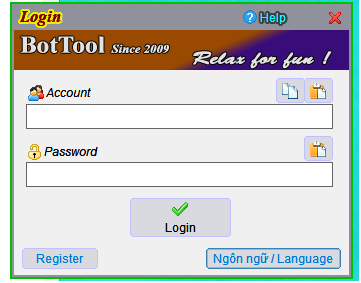
  2. I want Crack Login this program, they need Key for register. And when i using x32dbg, i can't find notify Success Login or Any thing else can use for dumb it. Also, when i try to debbug this program will be crash. That's very hard with me.
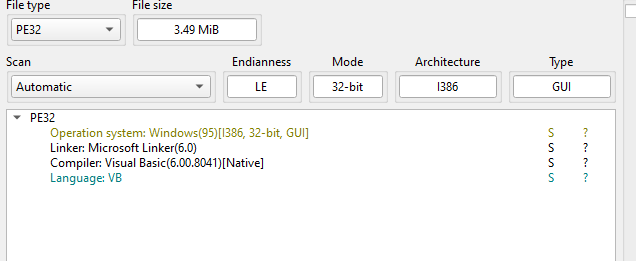
  3. Program Name: BTV2509 Protection Analysis (DIE, PEiD, ProtectionID results): VB 6 Native This program will crash when you trying to Debbug What Does the Program Do?: Auto For Game DDtank Private Supported Systems & Architectures: Windows 10-11 x32 & x64 Login ScreenShot: I noted below this post Download Link (Preferably Original): https://drive.google.com/file/d/1UezsEko9VvBtMbzlMrTGQ1xOnjIhmdXT/view Additional Notes: Thank you Guys!
Important Information

Terms of Use

Configure browser push notifications

Chrome (Android)
  1. Tap the lock icon next to the address bar.
  2. Tap Permissions → Notifications.
  3. Adjust your preference.
Chrome (Desktop)
  1. Click the padlock icon in the address bar.
  2. Select Site settings.
  3. Find Notifications and adjust your preference.