Saiki
Full Member
-
Joined
-
Last visited
Everything posted by Saiki
-
teşekkürler
-
UP
-
Crâcked by YAXİ & 0xRev Not Poligonda hilesiz 200 fps alıyorum hileyi açtığımda 70 fps düşürüyor radar eklemiş worldtoscreen dışına koymamış arkadaki adamlar radar göstermiyor oyun içinde özellik açarken ateş ediyor bidaki cracklediğimizde bu hataları görmek istemiyorum kesinlikle. Regedit açıldığında bsod attıran ilk koruma nam nam. Status : allahın dediği olur Desteklenen Pencereler Tam ekran pencere Menü : INSERT Hileyi Nasıl Çalıştırılırım 1. flash.exe açın. 2. Waiting For dediğinde oyunu açın. 3. Exeyi kapatmayın kendisi kapanıcaktır. İndir link.txt Virüs Total flash.exe virüs total Video https://youtu.be/roodIoH5lGE
-
-
yararlı konu
-
vmprotect hepsinde çalışıyormu
-
-
evet
-
upp
-
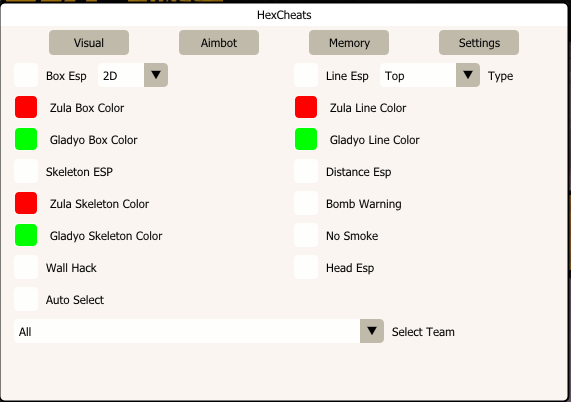
🛡 Status / Durum✅ 09.07.2025 - Undetected / Tespit Edilmedi ✅ 27.08.2025 A new driver has been added to the topic. Those who do not work should try it with it./Konuya yeni driver eklendi çalışmayanlar onunla birlikte denesin. ⚙ Gereksinimler / Requirements Menü gelmiyorsa oyunu tam ekran pencereli yapın If the menu doesn't appear, make the game full screen and windowed. Secure Boot: Devre dışı bırakılmalı. Secure Boot must be disabled. Eğer hile çalışmıyorsa aşağıdaki paketleri indirip kurun: If the cheat doesn't work, download and install: ➡ VC++ All-in-One ➡DirectX Runtime About Cheat: 🎯 Visual Mods (ESP & Wallhack) ✅ Box ESP (2D) 🎨 Zula Box Color (🔴 Red) 🎨 Gladio Box Color (🟢 Green) 🦴 Skeleton ESP 🎨 Zula Skeleton Color (🔴 Red) 🎨 Gladio Skeleton Color (🟢 Green) 🧱 Wall Hack 🎯 Auto Select 🔍 Line ESP (Top) 🎨 Zula Line Color (🔴 Red) 🎨 Gladio Line Color (🟢 Green) 📏 Distance ESP 💣 Bomb Warning 🚫 No Smoke 🎯 Head ESP 🧑🤝🧑 Select Team (All) 🎯 Aimbot Mods 🎯 Enable Aimbot 👁️ Visible Check ⌨️ Aim Key (Default: Ctrl) 🎯 AimBone (Default: Head) 🔒 Auto Lock 🔵 Circle FOV 🎨 Circle FOV Color (🔴 Red) 📏 Aim FOV 🧈 Smooth: 🧠 Memory Mods 🔫 No Recoil 🎯 No Spread 🔁 No Weapon Swap ⚡ Fast Reload 💤 Anti-AFK 🔴 Laser Dot 🔓 Spam Limit Unlocker 🔍 FOV Changer 🏃 Speed (E) 🇹🇷 Nasıl Kullanılırmanuel map drive'ı indirin içindeki dosyaları C:/ konumuna açın ve aşağıdaki komutu cmd yi yönetici çalıştırıp yapıştırın cd C:\C:>GDRVLoader.exe Michael10.sys load Hileyi yönetici olarak çalıştırın. EXE dosyasına sağ tıklayın → "Yönetici olarak çalıştır" seçeneğine tıklayın. Hile çalıştığında ekranda "Zulu- Waiting for..." yazısı gözükecektir. Bu yazıyı gördükten sonra Zulu oyununu başlatın. Oyun açıldıktan sonra klavyenizden Insert tuşuna basın. Hile aktif hale gelmiştir, otomatik olarak çalışır. 🇬🇧 How to Use Download manual map drive, extract the files in it to C:/ and paste the following command into cmd as administrator cd C:\C:>GDRVLoader.exe Michael10.sys load Run the cheat as administrator. Right-click on the EXE file → select "Run as administrator." When the cheat starts, the message "Zulu - Waiting for..." will appear on the screen. After seeing this message, launch the Zulu game. Once the game is fully loaded, press the Insert key on your keyboard. The cheat is now active and will function automatically. 📥 Hileyi İndir / Download the Cheatlink.txt 🧪 Virustotal Sonucu / VirusTotal Report📊 Dosya tamamen temizdir. Virustotal sonucu: 20/ 71 tespit ➡ Sonuçları Görüntüle The file is clean. VirusTotal scan: 21 / 70 detections.