





-
İnstaller link banned new link pls
-
Link GüncellendiLİNK GÜNCELLENDİLİNK GÜNCELLENDİSenden uçan kaçan kurtulmaz crackfrm burası :)@cambaz belki bir şeyler yapabilirsiniz.bunu ücretli mi yaptılar ya :D qweqwebir sitede satışa koymuş :) fiyattan :D milleti kandırma dolandırma peşindeler.
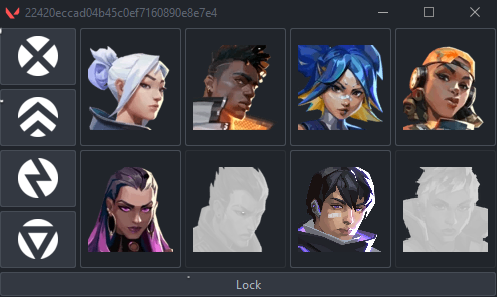
 Programı çalıştırmadan önce verilen zipteki tüm dosyaları masaüstüne klasör olarak çıkartmalısınız. Valorant kesinlikle açık olmalıdır, açık olmadığı takdirde program otomatik olarak kapanacaktır. Klasörün içerisindeki "start.bat" dosyasını çalıştırmalısınız. Hesabınızda açık olan ajanlar kitlenebilir olarak görünecektir, hesabınızda olmayan ajanları seçemezsiniz. Sadece "eu" regionlarında çalışmaktadır. Diğer regionlara sahip hesaplar ile oynuyorsanız çalışmayacaktır. Download.txt
 1. Run Bandicam as administrator. 2. Minimize the Bandicam screen by clicking on the arrow next to the screen icon in the upper left. 3. Run juba.exe as administrator and enter a random username and password, then open the game. 4. When the menu appears on your screen, you can open and close the menu with the INSERT key and make your settings, good games. 5. Tutorial Video: https://streamable.com/zqggdj Download.txt





Important Information
Account
Navigation
Search
Configure browser push notifications
Chrome (Android)
- Tap the lock icon next to the address bar.
- Tap Permissions → Notifications.
- Adjust your preference.
Chrome (Desktop)
- Click the padlock icon in the address bar.
- Select Site settings.
- Find Notifications and adjust your preference.
Safari (iOS 16.4+)
- Ensure the site is installed via Add to Home Screen.
- Open Settings App → Notifications.
- Find your app name and adjust your preference.
Safari (macOS)
- Go to Safari → Preferences.
- Click the Websites tab.
- Select Notifications in the sidebar.
- Find this website and adjust your preference.
Edge (Android)
- Tap the lock icon next to the address bar.
- Tap Permissions.
- Find Notifications and adjust your preference.
Edge (Desktop)
- Click the padlock icon in the address bar.
- Click Permissions for this site.
- Find Notifications and adjust your preference.
Firefox (Android)
- Go to Settings → Site permissions.
- Tap Notifications.
- Find this site in the list and adjust your preference.
Firefox (Desktop)
- Open Firefox Settings.
- Search for Notifications.
- Find this site in the list and adjust your preference.