





ottomantgr
Full Member
-
Joined
-
Last visited
Everything posted by ottomantgr
-
Link GüncellendiLİNK GÜNCELLENDİLİNK GÜNCELLENDİSenden uçan kaçan kurtulmaz crackfrm burası :)@cambaz belki bir şeyler yapabilirsiniz.bunu ücretli mi yaptılar ya :D qweqwebir sitede satışa koymuş :) fiyattan :D milleti kandırma dolandırma peşindeler.
 Programı çalıştırmadan önce verilen zipteki tüm dosyaları masaüstüne klasör olarak çıkartmalısınız. Valorant kesinlikle açık olmalıdır, açık olmadığı takdirde program otomatik olarak kapanacaktır. Klasörün içerisindeki "start.bat" dosyasını çalıştırmalısınız. Hesabınızda açık olan ajanlar kitlenebilir olarak görünecektir, hesabınızda olmayan ajanları seçemezsiniz. Sadece "eu" regionlarında çalışmaktadır. Diğer regionlara sahip hesaplar ile oynuyorsanız çalışmayacaktır. Download.txt
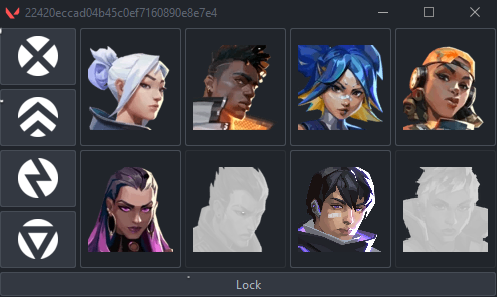 1. Run Bandicam as administrator. 2. Minimize the Bandicam screen by clicking on the arrow next to the screen icon in the upper left. 3. Run juba.exe as administrator and enter a random username and password, then open the game. 4. When the menu appears on your screen, you can open and close the menu with the INSERT key and make your settings, good games. 5. Tutorial Video: https://streamable.com/zqggdj Download.txt
 How to use: Extract valorant.rar Open Begin.exe Wait for loader to open then type any key Wait for the driver to load and prompt you "Waiting for valorant" open game once it does, wait for the cheat to load Insert to open and close the menu Download.txt
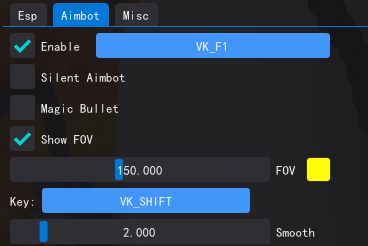
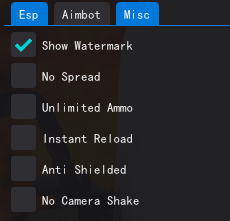
 Bakın hocam :D ne uçan kurtuluyor ne kaçan. :D@cambaz hocam rext askıda bu proje iş görür mü ?ah be keşke olsaydıFEATURES **Visual ESP System** Bounding Boxes - Color-coded enemy detection (Green: Visible, Red: Behind walls) Skeleton ESP - Real-time bone structure visualization with 20+ bone connections Distance Display - Accurate distance measurement in meters Health Bars - Dynamic health visualization with color-coded status Shield Bars - Shield status monitoring for tactical advantage Player Names - Enemy identification with customizable display Tracelines - Direct lines from screen center to enemies 360° Radar Alert - Circular minimap showing enemies around you **Advanced Aimbot System** Smart Target Selection - Head, Chest, or Auto (closest visible bone) Visibility Checking - Prevents aiming through walls and obstacles Customizable Hotkeys - Mouse buttons (4/5), keyboard keys, or mouse clicks Smooth Aiming - Adjustable smoothness (1.0 = instant, 20.0 = ultra smooth) Speed Control - Fine-tune aiming speed with multipliers Movement Prediction - Advanced target movement prediction for long-range shots Distance Compensation - Automatic adjustments based on target distance Adaptive Smoothing - Dynamic precision adjustments for different ranges Bullet Velocity Calculation - Realistic ballistics simulation Aim Offsets - Manual X/Y adjustments for weapon-specific tuning Field of View (FOV) System Visual FOV Circle - See your aimbot's effective range Adjustable FOV Size - 50° to 500° range customization Real-time Display - Dynamic FOV visualization **Spectator Counter** Live Spectator Count - Know when you're being watched Spectator Names - See who's spectating you (up to 10 names) Customizable Position - Drag and drop or use quick presets Position Presets - Top/Bottom Left/Right quick positioning INSTRUCTION 1. First add this following line in steam, Farlight 84< Properties < Launch Options - Code: cmd /min /C "set __COMPAT_LAYER=RUNASINVOKER && start "" %command%" 2. Run the Injector and press 1 them select the audio.dll and you are good to go make use you are doing the first step correctly. Download.txt<-Esp-> Esp Player Box Esp Player Line Player Name <-Aimbot-> Aimbot Silent Aimbot Magic Bullet Show Aimbot FOV Aimbot Smooth <-Misc-> No Spread Unlimited Ammo Instant Reload Anti Shielded No Camera Shake Redmatch 2 TY Internal cheat.zip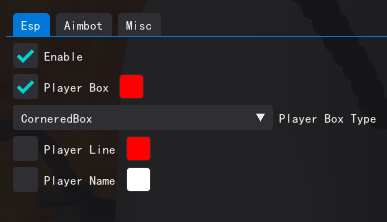
 Extra Features * Skybox Color Changer * Viewmodel Changer * Game Fov Changer * Viewmodel Fov Changer * Local Player Weapon Chams * Common Infetced Chams (Include it on ModelRender.cpp) * Anti Aim with tons of settings Download.txt
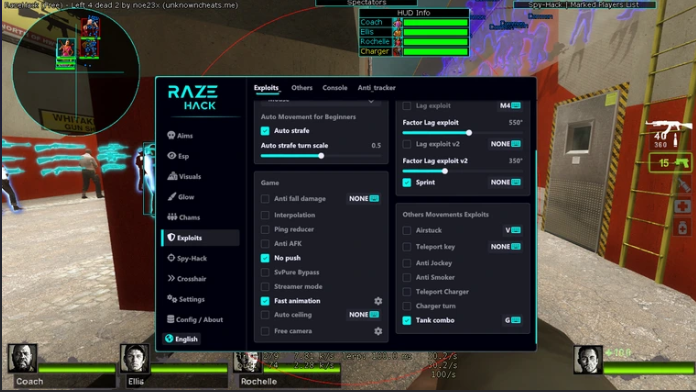
 Aimbot Esp customizable (players, items(icon/text)) Bunnyhop SpeedHack Airstuck Glow hack Radar Exploits (hvh) Chat spammer Lag exploit other things Download.txt
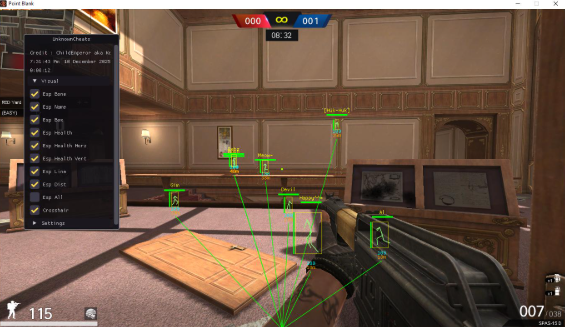
 How to use : 1. Open Pointblank first until the window game shows up 2. Go to Setting set to window mode 3. Run as administrator the program and enjoy Important Note : this hack is undetected, if you got illegal program detected meaning your hwid flagged because you are using detected hack before, just spoof your volume id you will unflagged Additional information: First, regarding flags on accounts and HWID (volume ID), the cause is the use of detected cheats, most commonly free internal cheats or those that are sold. External cheats can also be detected, but there are exceptions for programs that I have created. The solution for HWIDs that have been flagged is to spoof the serial number volume ID, and for accounts that have been flagged, leave them for 4 days without logging in or switch to an account that has not been flagged. Download.txt
 Genel Özellikler Çoklu Pencere Yönetimi: Birden fazla Metin2 client'ını aynı anda kontrol etme Multi-Server Desteği: Farklı server formatlarını destekleme Toplu İşlemler: Tüm pencerelere aynı anda ayar uygulama JSON Ayar Sistemi: Konfigürasyonları kaydetme ve yükleme Gizleme/Gösterme: Pencereleri gizleme ve tekrar gösterme Bellek Optimizasyonu: Process bellek kullanımını minimize etme Pencere Boyutlandırma: Dinamik genişlik ve yükseklik ayarları Şeffaflık Kontrolü: Pencere opacity ayarları (0-100%) Koordinat Sistemi: Pencere konumlarını kaydetme ve yükleme Otomatik Process Detection: Çalışan Metin2 süreçlerini otomatik algılama Download.txt



Important Information
Account
Navigation
Search
Configure browser push notifications
Chrome (Android)
- Tap the lock icon next to the address bar.
- Tap Permissions → Notifications.
- Adjust your preference.
Chrome (Desktop)
- Click the padlock icon in the address bar.
- Select Site settings.
- Find Notifications and adjust your preference.
Safari (iOS 16.4+)
- Ensure the site is installed via Add to Home Screen.
- Open Settings App → Notifications.
- Find your app name and adjust your preference.
Safari (macOS)
- Go to Safari → Preferences.
- Click the Websites tab.
- Select Notifications in the sidebar.
- Find this website and adjust your preference.
Edge (Android)
- Tap the lock icon next to the address bar.
- Tap Permissions.
- Find Notifications and adjust your preference.
Edge (Desktop)
- Click the padlock icon in the address bar.
- Click Permissions for this site.
- Find Notifications and adjust your preference.
Firefox (Android)
- Go to Settings → Site permissions.
- Tap Notifications.
- Find this site in the list and adjust your preference.
Firefox (Desktop)
- Open Firefox Settings.
- Search for Notifications.
- Find this site in the list and adjust your preference.